
Used Laptop Lifespan and Component Upgrade Guide
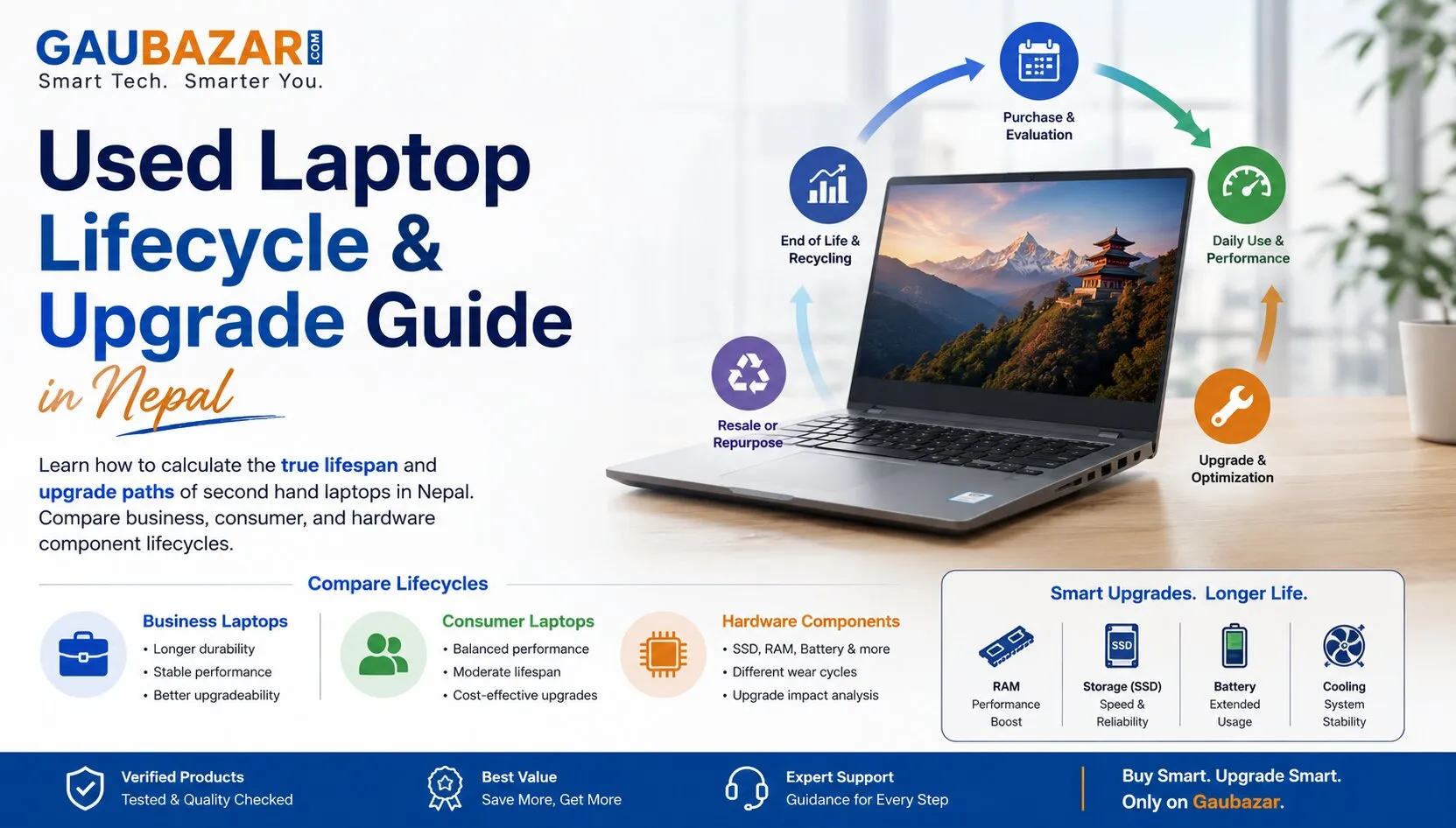
The consumer electronics marketplace across Nepal has experienced an incredible shift, with high performance computing equipment solidifying its position as an absolute necessity for computing students, professional remote engineers, data analysts, and digital creative houses. Because brand new laptops imported into the country face significant customs duties, luxury distribution overheads, and immediate retail inflation, securing a brand new device can place a heavy burden on household savings. Consequently, purchasing a pre owned machine has emerged as a highly practical alternative to maximize performance capabilities per rupee spent.
However, calculating the true value of a technology investment requires looking past basic cosmetic exterior shells to evaluate hardware longevity and architectural components. Buyers often fall into the trap of purchasing consumer grade models that have reached the absolute end of their physical operational cycles, or choosing machines with locked component designs that prevent future hardware memory expansions. To build complete transparency and help buyers navigate these variables, this comprehensive guide analyzes structural lifespans, enterprise versus consumer design builds, and strategic component upgrade paths before you purchase a second hand laptop in nepal.
1. The Science of Laptop Lifespans: Enterprise vs. Consumer Build Classifications
To evaluate a pre owned computing asset with the accuracy of an IT infrastructure procurement officer, you must understand how different hardware lineups are manufactured. The physical life expectancy of a notebook depends heavily on whether its chassis was engineered for the corporate boardroom or the general retail consumer market:
| Hardware Engineering Parameter | Enterprise Business Class (e.g., ThinkPad, Latitude) | Consumer Retail Class (e.g., IdeaPad, Inspiron) | |
|---|---|---|---|
| Primary Chassis Materials | Magnesium alloy, carbon fiber, aluminum plating | Standard ABS engineered plastics, thin composite sheets | |
| Expected Structural Lifespan | 7 to 10 Years under continuous field deployment | 3 to 5 Years under typical domestic handling | |
| Motherboard Component Grade | High-density capacitors built for continuous duty cycles | Standard retail grade silicon optimized for cost efficiency | |
| Hinge and Flex Tolerance | Steel reinforced drop-hinges tested for 30,000 cycles | Plastic-anchored tension brackets prone to stress cracking |
Understanding these engineering differences helps you make a smarter choice when browsing available listings. While a consumer machine might look slightly sleeker, an enterprise business model maintains far superior physical integrity over time. Choosing an aluminum or magnesium chassis ensures your system can easily withstand the structural strains of daily commuting and transport.
2. Evaluating Motherboard Upgradability and Locked Hardware Layouts
A major risk when buying pre owned hardware is purchasing a machine that cannot be expanded to meet changing software demands. Modern operating systems and creative applications require increasing amounts of system memory to run smoothly without lag. Before finalizing your transaction, you must check whether the motherboard layout supports physical hardware upgrades:
SO-DIMM RAM Slots versus Soldered Memory: Many ultra slim modern notebooks feature Random Access Memory (RAM) chips soldered directly onto the motherboard architecture. This means the memory capacity is permanently locked and can never be upgraded. Prioritize laptops that include open small outline dual in-line memory module (SO-DIMM) slots, which allow you to simply pop in an extra memory stick to double your multi-tasking capabilities down the line.
M.2 NVMe Storage Expansion Lanes: Storage technology has evolved past slow, spinning magnetic hard drives. Modern systems rely on high speed M.2 solid state drives running on the non-volatile memory express (NVMe) protocol. Ensure the machine features an easily accessible M.2 slot. Having a system with upgradeable storage means you can easily swap out a low capacity drive for a massive one terabyte module as your file storage needs expand.
3. Component Aging Analysis and Wear Thresholds
Every internal component inside a laptop experiences structural aging based on historical use and thermal exposure. Knowing how to check these wear thresholds ensures you negotiate a fair arrangement based on factual hardware remaining utility:
- Processor Thermal Degradation: While central processing units from Intel and AMD do not mechanically wear out, prolonged exposure to high heat due to clogged cooling paths can cause permanent degradation of the internal thermal interface material. For a deep look at how robust dual fan setups protect internal silicon during long workloads, make sure to read our comprehensive guide on the best gaming laptops specs in nepal.
- Liquid Crystal Display (LCD) Backlight Decay: Inspect the display panel against a clean white background. Check for uneven bright spots, known as pressure marks, or a faint yellow tint around the outer edges, which indicates the internal LED backlight layers are reaching the end of their operational lifespan.
- Keyboard and Trackpad Interface Fatigue: Type on every individual key to ensure the internal membrane switches register keypresses smoothly. Worn out keyboards will feel mushy or skip letters, which can drastically slow down your typing speed during coding sessions or documentation tasks.
4. Software Compatibility and Future OS Support Life
A high performance laptop remains useful only as long as it continues to receive official security definitions and operating system updates. Microsoft and Apple enforce strict hardware requirements for their modern platforms, meaning specific older processor lines are officially locked out from receiving critical software updates.
For example, official installations of modern Windows operating systems require a physical security chip known as a Trusted Platform Module (TPM 2.0). Ensure the pre owned machine contains at least an eighth generation Intel Core processor or an AMD Ryzen 2000 series chip or newer. Sourcing a system that complies with these security parameters ensures your computer remains fully protected against digital vulnerabilities while maintaining complete compatibility with the newest application suites.
5. Strategic Marketplace Sourcing and Risk Mitigation
Sourcing your hardware needs directly through physical recondition storefronts often introduces steep retail markups to cover physical real estate overheads. Utilizing open digital classified networks allows you to interact directly with individual tech enthusiasts, upgrade seekers, and corporate liquidation listings, establishing a clean environment to compare a second hand laptop baseline.
When you discover an ideal listing, always arrange the physical meetup in a safe, public environment. Take your time to run diagnostic software checkups from a USB flash drive, verify the serial tags against the main system bios screen, and check the pixel uniformity of the screen. For a comprehensive list of specific step-by-step diagnostic software tools and physical inspection checklists to execute during a meetup, review our definitive expert guide to inspecting used laptops. Sourcing an authentic machine from an individual who has treated their equipment well allows you to secure premium computing power at a massive discount compared to retail costs.
Frequently Asked Questions (FAQs)
1. Is it possible to upgrade the graphics processing unit or main processor of a used laptop?
No, on almost all modern laptops, the central processing unit (CPU) and graphics processing unit (GPU) are permanently soldered directly onto the main system motherboard architecture. They cannot be removed or upgraded down the line. Because these core chips are permanent, you must ensure you select a machine with a powerful processor from day one, focusing your later upgrades strictly on expanding RAM and storage capacities.
2. What is the practical performance difference between a standard SATA SSD and an NVMe SSD?
Standard SATA solid state drives max out at data transfer speeds of roughly five hundred megabytes per second. Modern M.2 NVMe solid state drives utilize high speed PCIe lanes to achieve read and write speeds exceeding three thousand five hundred megabytes per second. This massive speed difference means an NVMe drive loads heavy application files, processes extensive code compilers, and boots the operating system up to seven times faster than a SATA drive.
3. How do I clear out internal dust accumulation on a second hand laptop?
You should carefully remove the bottom chassis cover screws using a precision screwdriver set. Use a small can of compressed air to blow out dust particles trapped inside the cooling fan blades and copper heat sinks, making sure to hold the fan blades steady so they do not spin rapidly and damage the bearings. Cleaning out dust blockage every six months drastically improves internal thermal performance and extends the lifespan of the laptop hardware.
Conclusion
Investing in a pre owned computing station is an incredibly intelligent way to secure high performance hardware while fully insulating your budget from steep initial retail depreciation. By systematically analyzing frame material builds, verifying motherboard upgradability parameters, testing component wear thresholds, and using digital marketplace directories to search authentic second hand laptop price in nepal variables, you can secure an exceptional asset. Proceed methodically, perform extensive stress tests in person, and unlock a highly productive, cost effective technology upgrade for your daily workflow.

Comments (0)
No comments yet - be the first to share your thoughts.